
Page Agent
<picture> <source media="(prefers-color-scheme: dark)" srcset="https://page-agent.github.io/assets/readme/banner-dark.png"> <img alt="Page Agent Banner" src="https://page-agent.github.io/assets/readme/banner-light.png"> </picture>






The GUI Agent Living in Your Webpage. One script gives any web page its own AI agent.
<a href="https://trendshift.io/repositories/22551?utm_source=repository-badge&utm_medium=badge&utm_campaign=badge-repository-22551" target="_blank" rel="noopener noreferrer"><img src="https://trendshift.io/api/badge/repositories/22551" alt="alibaba%2Fpage-agent | Trendshift" width="180"/></a>
🌐 English | 中文
<a href="https://alibaba.github.io/page-agent/" target="_blank"><b>🚀 Demo</b></a> | <a href="https://alibaba.github.io/page-agent/docs/introduction/overview" target="_blank"><b>📖 Docs</b></a> | <a href="https://news.ycombinator.com/item?id=47264138" target="_blank"><b>📢 HN Discussion</b></a> | <a href="https://x.com/simonluvramen" target="_blank"><b>𝕏 Follow on X</b></a>
<!-- demo video -->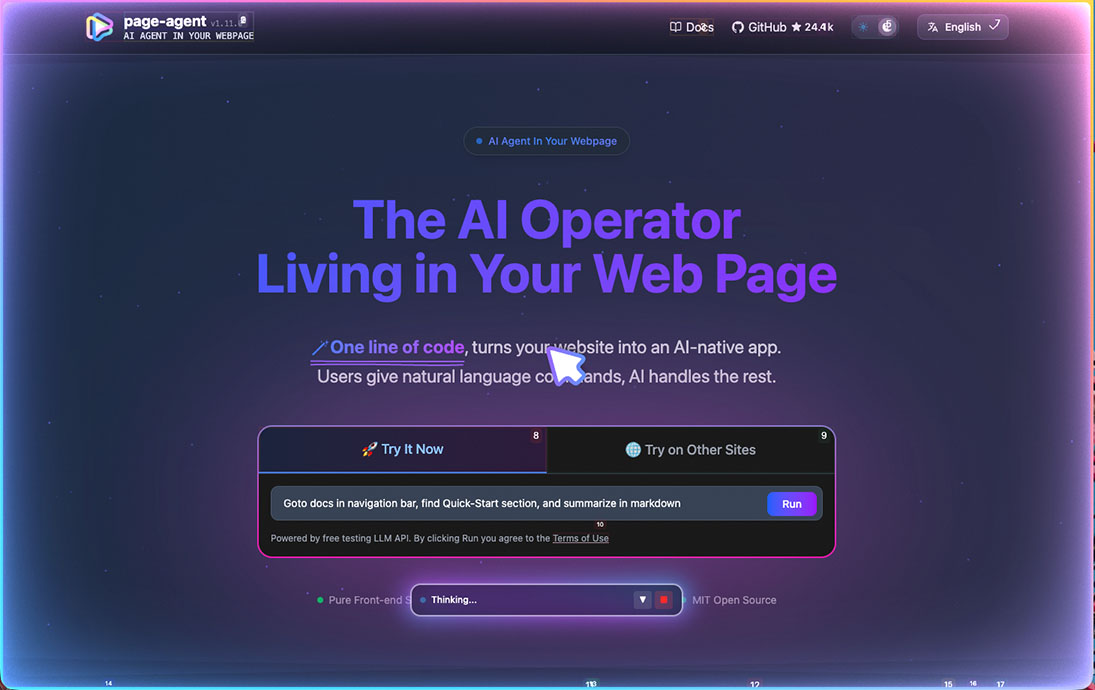
✨ Features
- 🎯 Easy integration
- No need for
browser extension/python/headless browser. - Just in-page javascript. Everything happens in your web page.
- No need for
- 📖 Text-based DOM manipulation
- No screenshots. No multi-modal LLMs or special permissions needed.
- 🧠 Bring your own LLMs
- Works with most mainstream models, including locally deployed ones. See supported models.
- 🐙 Optional chrome extension for multi-page tasks.
- And an MCP Server (Beta) to control it from outside
💡 Use Cases
- SaaS AI Copilot — Ship an AI copilot in your product in lines of code. No backend rewrite.
- Smart Form Filling — Turn 20-click workflows into one sentence. Perfect for ERP, CRM, and admin systems.
- Accessibility — Make any web app accessible through natural language. Voice commands, screen readers, zero barrier.
- Multi-page Agent — Extend your own web agent's reach across browser tabs via the Chrome extension.
- MCP - Allow your agent clients to control your browser.
🚀 Quick Start
One-line integration
Fastest way to try PageAgent with our free Demo LLM:
<script
    src="https://cdn.jsdelivr.net/npm/page-agent@1.12.4/dist/iife/page-agent.demo.js"
    crossorigin="anonymous"
></script>

<!-- China CDN mirror if you can't access jsDelivr -->
<!-- https://registry.npmmirror.com/page-agent/1.12.4/files/dist/iife/page-agent.demo.js -->
⚠️ For technical evaluation only. This demo CDN uses our free testing LLM API. By using it, you agree to its terms.
Add
?autoInit=falseto load the script without creating the demo agent automatically. You can then instantiate it withnew window.PageAgent(...)and your own LLMs.
NPM Installation
npm install page-agent
import { PageAgent } from 'page-agent'

const agent = new PageAgent({
    model: 'qwen3.5-plus',
    baseURL: 'https://dashscope.aliyuncs.com/compatible-mode/v1',
    apiKey: 'YOUR_API_KEY',
    language: 'en-US',
})

await agent.execute('Click the login button')
For more programmatic usage, see 📖 Documentations.
🤝 Contributing
We welcome contributions from the community! See CONTRIBUTING.md for guidelines and docs/developer-guide.md for local development workflows.
Built something cool with PageAgent? Share it in Show and Tell. 🙌
Please read the maintainer's note on principles and current state.
Contributions generated entirely by bots or AI without substantial human involvement will not be accepted.
⚖️ License
👏 Acknowledgments
This project builds upon the excellent work of browser-use.
PageAgent is designed for client-side web enhancement, not server-side automation.
DOM processing components and prompt are derived from browser-use:

Browser Use <https://github.com/browser-use/browser-use>
Copyright (c) 2024 Gregor Zunic
Licensed under the MIT License

We gratefully acknowledge the browser-use project and its contributors for their
excellent work on web automation and DOM interaction patterns that helped make
this project possible.
⭐ Star this repo if you find PageAgent helpful!