
WebCalendar




WebCalendar is a multi-user, web-based calendar application built with PHP. It supports multiple database backends, features event management, user groups, access controls, and integrates with external applications. Designed for both personal and enterprise use, WebCalendar can be deployed on any web server with PHP support.
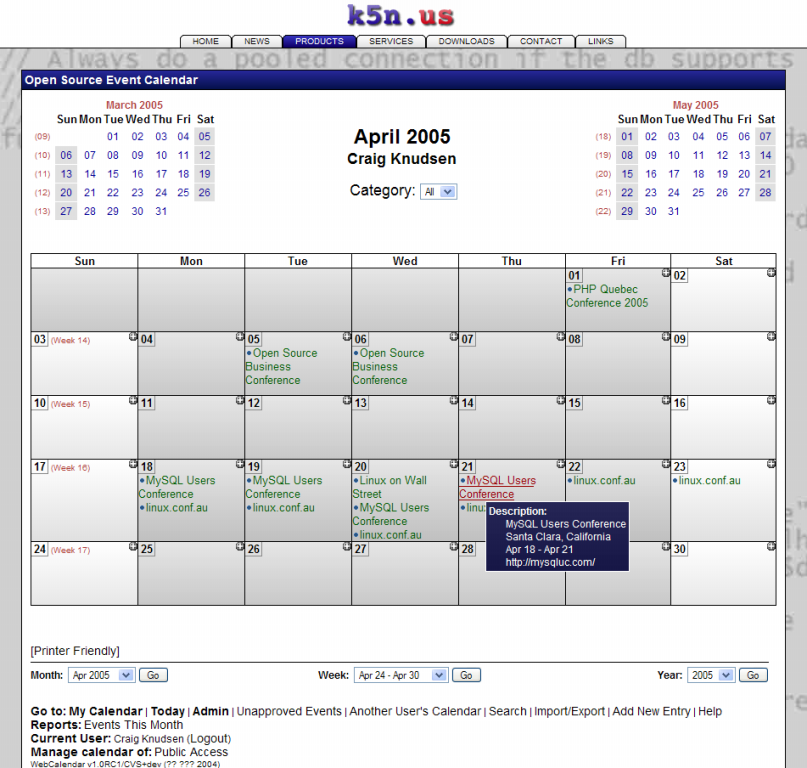
Features
- Multiple Calendar Views - Month, week, day, year, and agenda views
- Multi-User Support - User management with groups and permissions
- Recurring Events - Support for complex event repetition patterns
- Access Control - Granular permissions for viewing and editing events
- Email Notifications - Event reminders and updates via email
- Responsive Design - Works on desktop and mobile devices
- Multi-Language - Translation files for 100+ languages (~35 human-contributed with substantial coverage)
- iCal Import/Export - Import and export calendar data in iCalendar format
- External Integration - LDAP, IMAP, and custom authentication bridges
- Docker Ready - Pre-built Docker images for easy deployment
- MCP Server - Model Context Protocol support for AI assistant integration
Requirements
- PHP 8.2+ (tested against 8.2, 8.3, 8.4)
- Database: MySQL/MariaDB, PostgreSQL, or SQLite3
- Web server: Apache or Nginx with PHP support
Quick Start
Using Docker (Recommended)
# Clone the repository
git clone https://github.com/craigk5n/webcalendar.git
cd webcalendar

# Build and start with Docker Compose
docker compose -f docker/docker-compose-prod.yml up -d --build

# Open http://localhost:8080 and complete the install wizard
The wizard creates the administrator account; there is no default login.
See docs/installation.md for a scripted
install and for running the published craigk5n/webcalendar image.
Manual Installation
-
Download the latest release or clone the repository:
git clone https://github.com/craigk5n/webcalendar.git -
Point your web server to the WebCalendar directory
-
Run the web-based installer by visiting your WebCalendar URL:
https://yourserver.com/webcalendar/The installer will automatically redirect to the setup wizard.
-
Follow the guided setup to configure your database and admin user
Headless Installation
For automated deployments, use the headless installer:
php wizard/headless.php
See the Installation Guide for detailed instructions.
Docker Development
Build and run a development environment with live file mounting:
# Start the development containers (MariaDB + PostgreSQL)
docker-compose -f docker/docker-compose-dev.yml up

# Access at http://localhost:8080 (MariaDB) or http://localhost:8081 (PostgreSQL)
Changes to your local files are immediately reflected in the container.
See Docker Deployment for all available configurations.
Configuration
Environment Variables
WebCalendar supports containerized deployments via environment variables:
# Docker Compose example
environment:
  WEBCALENDAR_USE_ENV: "true"
  WEBCALENDAR_DB_TYPE: mysqli
  WEBCALENDAR_DB_HOST: db
  WEBCALENDAR_DB_DATABASE: webcalendar
  WEBCALENDAR_DB_LOGIN: webcalendar
  WEBCALENDAR_DB_PASSWORD: "your_secure_password"
  WEBCALENDAR_MODE: prod
For Apache deployments, add to .htaccess or web server configuration:
SetEnv WEBCALENDAR_USE_ENV true
SetEnv WEBCALENDAR_DB_TYPE mysqli
SetEnv WEBCALENDAR_DB_HOST localhost
SetEnv WEBCALENDAR_DB_DATABASE webcalendar
SetEnv WEBCALENDAR_DB_LOGIN webcalendar
SetEnv WEBCALENDAR_DB_PASSWORD "your_secure_password"
SetEnv WEBCALENDAR_MODE prod
Database Support
- ✅ MySQL / MariaDB (recommended)
- ✅ PostgreSQL
- ✅ SQLite3
Legacy backends (code present, untested on PHP 8): Oracle, DB2, ODBC, Interbase
Testing
Run the test suite with PHPUnit:
# Install dev dependencies (only needed for testing/development)
composer install

# Run PHPUnit tests
cd tests; ./run_unit_tests.sh; cd ..

# Syntax check all PHP files
cd tests; ./compile_test.sh; cd ..
Building from Source
WebCalendar includes all required dependencies in the release: front-end assets in pub/, PHPMailer in includes/classes/phpmailer/, and the MCP SDK in includes/classes/mcp-sdk/. You do not need to run Composer unless you are adding or updating dependencies.
If you need to modify dependencies:
# Install PHP dependencies (only needed for adding/updating dependencies)
composer install

# Copy vendor assets to project directories (requires Linux — uses sha384sum)
make

# After `composer update mcp/sdk`: refresh the bundled MCP SDK (any OS) and
# commit includes/classes/mcp-sdk/ and release-files together
make mcp-sdk
External Application Integration
WebCalendar can integrate with external systems for user authentication and configuration:
User Integration
Create a bridge script in includes/user-app-yourapp.php:
// Implement required functions for authentication
function user_valid_login($login, $password) { ... }
function user_get_users() { ... }
See user-ldap.php and user-app-joomla.php for examples.
Configuration Integration
Create includes/config-app-yourapp.php to override settings dynamically.
Roadmap
v1.9.16
- PHP 8.2+ required (tested against 8.2, 8.3, 8.4)
- New web-based installation/upgrade wizard
- Headless CLI installer for automated deployments
- MCP server for AI assistant integration
- Multi-database Docker test infrastructure
v2.0.0 (Planned)
- Modernized codebase with PHP 8.2+ features
- Namespace implementation
- Enhanced security and access control
Documentation
- Installation Guide - System requirements, setup wizard, Docker
- Admin Guide - User management, system settings, email
- Command Line -
bin/webcal.php: recovery, backup, import/export - User Guide - Calendar views, events, preferences
- Upgrade Guide - Upgrading from previous versions
- Database Schema - Table definitions
- Developer Guide - Architecture, coding standards, testing
- MCP Server - AI assistant integration
Browse the full documentation or see the docs index on GitHub.
Security
To report a security vulnerability, please see SECURITY.md. Do not open a public issue for security reports.
Contributing
Contributions are welcome! Please read the Contributing Guide for details.
- Fork the repository
- Create a feature branch (
git checkout -b feature/amazing-feature) - Commit your changes (
git commit -m 'Add amazing feature') - Push to the branch (
git push origin feature/amazing-feature) - Open a Pull Request
Bug reports and feature requests use GitHub issue templates.
This project has a Code of Conduct. Please follow it in all interactions.
License
WebCalendar is licensed under the GNU General Public License v2.0.
Changelog
See CHANGELOG.md for release history.
Links
- Website: https://k5n.us/webcalendar/
- Issues: https://github.com/craigk5n/webcalendar/issues
- Releases: https://github.com/craigk5n/webcalendar/releases
Maintainer
Craig Knudsen - craig@k5n.us - https://k5n.us
See AUTHORS for a complete list of contributors.