
Agent Development Kit (ADK) 2.0







Agent Development Kit (ADK) is a flexible and modular framework that applies software development principles to AI agent creation. It is designed to simplify building, deploying, and orchestrating agent workflows, from simple tasks to complex systems. While optimized for Gemini, ADK is model-agnostic, deployment-agnostic, and compatible with other frameworks.
✨ Key Features
-
Workflow Runtime: A graph-based execution engine for composing deterministic execution flows for agentic apps, with support for routing, fan-out/fan-in, loops, retry, state management, dynamic nodes, human-in-the-loop, and nested workflows.
-
Task API: Structured agent-to-agent delegation with multi-turn task mode, single-turn controlled output, mixed delegation patterns, human-in-the-loop, and task agents as workflow nodes.
-
Modular Multi-Agent Systems: Design scalable applications by composing multiple specialized agents into flexible hierarchies.
-
Rich Tool Ecosystem: Utilize pre-built tools, custom functions, OpenAPI specs, MCP tools or integrate existing tools to give agents diverse capabilities, all for tight integration with the Google ecosystem.
-
Code-First Development: Define agent logic, tools, and orchestration directly in Python for ultimate flexibility, testability, and versioning.
-
Agent Config: Build agents without code. Check out the Agent Config feature.
-
Tool Confirmation: A tool confirmation flow (HITL) that can guard tool execution with explicit confirmation and custom input.
-
Deploy Anywhere: Easily containerize and deploy agents on Cloud Run or scale seamlessly with Vertex AI Agent Engine.
🚀 Installation
Stable Release (Recommended)
You can install the latest stable version of ADK using pip:
pip install google-adk
Requirements: Python 3.11+.
For transitive dependency protection, we recommend installing with our companion constraints files (for python 3.11 to 3.15).
Choose the constraints file matching your Python version:
# For example, for Python 3.11
curl -o constraints-3.11.txt https://raw.githubusercontent.com/google/adk-python/main/constraints-3.11.txt
pip install google-adk -c constraints-3.11.txt
rm constraints-3.11.txt
To install optional integrations, you can use the following command:
pip install "google-adk[extensions]"
The release cadence is roughly bi-weekly.
Development Version
Bug fixes and new features are merged into the main branch on GitHub first. If you need access to changes that haven't been included in an official PyPI release yet, you can install directly from the main branch:
pip install git+https://github.com/google/adk-python.git@main
Note: The development version is built directly from the latest code commits. While it includes the newest fixes and features, it may also contain experimental changes or bugs not present in the stable release. Use it primarily for testing upcoming changes or accessing critical fixes before they are officially released.
Quick Start
Beginner Note: ADK applications are built using two main classes:
Agent(defines an AI's instructions, tools, and behavior) andWorkflow(orchestrates agents and tasks in a graph-based flow).
Agent
from google.adk import Agent

root_agent = Agent(
    name="greeting_agent",
    model="gemini-3.5-flash",
    instruction="You are a helpful assistant. Greet the user warmly.",
)
Workflow
from google.adk import Agent, Workflow

generate_fruit_agent = Agent(
    name="generate_fruit_agent",
    instruction="Return the name of a random fruit. Return only the name.",
)

generate_benefit_agent = Agent(
    name="generate_benefit_agent",
    instruction="Tell me a health benefit about the specified fruit.",
)

root_agent = Workflow(
    name="root_agent",
    edges=[("START", generate_fruit_agent, generate_benefit_agent)],
)
Run Locally
# Interactive CLI
adk run path/to/my_agent

# Web UI (supports multi-agent directories or pointing directly to a single agent folder)
adk web path/to/agents_dir
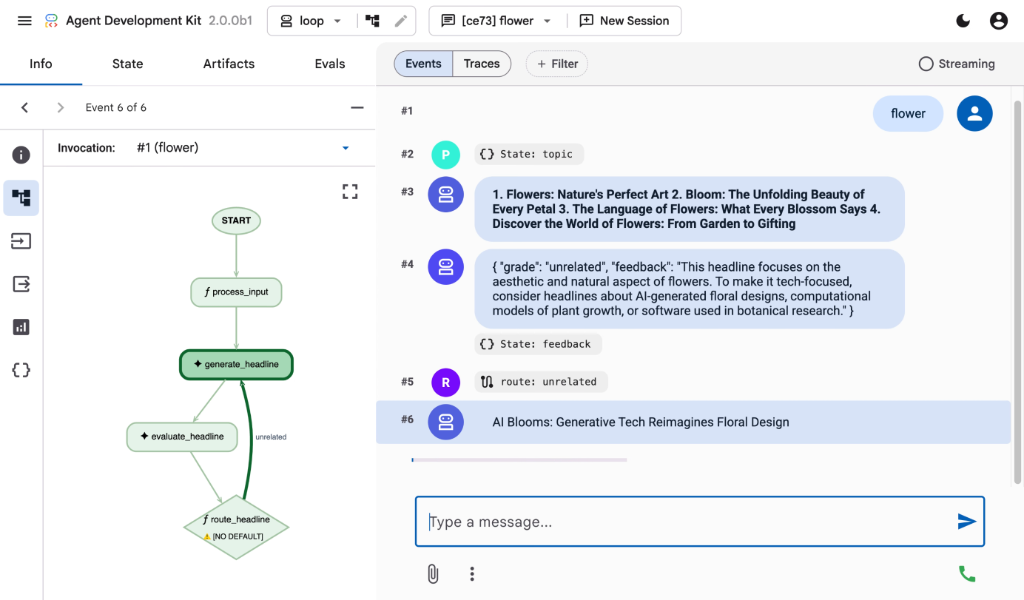
Development UI
A built-in development UI to help you test, evaluate, debug, and showcase your agent(s).

Evaluate Agents
Run the bundled evaluation sample from the repo root:
adk eval \
    contributing/samples/evaluation/home_automation_agent \
    contributing/samples/evaluation/basic_criteria/home_automation.evalset.json \
    --config_file_path contributing/samples/evaluation/basic_criteria/eval_config.json
🚀 Deployment Options
Deploying the Agent Locally with Docker Container:
adk deploy docker --with_ui <agent-folder>
Deploying the Agent in Google Cloud (Cloud Run)
adk deploy cloud_run --with_ui <agent-folder>
You may set the following environment variables in adk command, or in a .env file instead.
adk deploy cloud_run --with_ui --env GOOGLE_GENAI_USE_ENTERPRISE=1 <agent-folder>
📚 Documentation
- Getting Started: https://adk.dev/
- Guides: See
docs/guides/for task-oriented walkthroughs of agents, tools, events, plugins, and workflows. - Samples: See
contributing/samples/for runnable example agents.
🤝 Contributing
We welcome contributions from the community! Whether it's bug reports, feature requests, documentation improvements, or code contributions, please see our:
- General contribution guideline and flow.
- Code Contributing Guidelines to get started.
Community Repo
We have the adk-python-community repo that is home to a growing ecosystem of community-contributed tools, third-party service integrations, and deployment scripts that extend the core capabilities of the ADK.
Vibe Coding
If you want to develop an agent via vibe coding, the llms.txt and llms-full.txt files published on the ADK documentation site can be used as context for an LLM. The former is a summarized version, while the latter contains the full documentation for LLMs with a large context window.
Community Events
- [Completed] ADK's 1st community meeting on Wednesday, October 15, 2025. Remember to join our group to get access to the recording, and deck.
📄 License
This project is licensed under the Apache 2.0 License — see the LICENSE file for details.
Happy Agent Building!