
Heavily inspired by Neuro-sama
[!TIP] On Windows, you can also install AIRI with winget:
winget install MoeruAI.AIRIOr install AIRI with Scoop:
scoop bucket add airi https://github.com/moeru-ai/airi
scoop install airi/airi
On macOS, you can install AIRI with Homebrew Cask without adding a custom tap:
brew install --cask airi
[!WARNING] Attention: We do not have any officially minted cryptocurrency or token associated with this project. Please check the information and proceed with caution.
[!NOTE]
We've got a whole dedicated organization @proj-airi for all the sub-projects born from Project AIRI. Check it out!
RAG, memory system, embedded database, icons, Live2D utilities, and more!
[!TIP] You can translate AIRI on Crowdin, or open a pull request that changes
packages/i18n/src/locales/. Both ways update the same translations.Do not submit a translation that is the same as the English text. Review rejects it. A string without a translation shows the English text.
<a href="https://crowdin.com/project/proj-airi" target="_blank" rel="nofollow"><img style="width: 140px; height: 40px;" src="https://badges.crowdin.net/badge/light/crowdin-on-dark.png" srcset="https://badges.crowdin.net/badge/light/crowdin-on-dark.png 1x, https://badges.crowdin.net/badge/light/crowdin-on-dark@2x.png 2x" alt="Crowdin | Agile localization for tech companies" width="140" height="40" /></a>
Have you dreamed about having a cyber living being (cyber waifu, digital pet) or digital companion that could play with and talk to you?
With the power of modern large language models like ChatGPT and famous Claude, asking a virtual being to roleplay and chat with us is already easy enough for everyone. Platforms like Character.ai (a.k.a. c.ai) and JanitorAI as well as local playgrounds like SillyTavern are already good-enough solutions for a chat based or visual adventure game like experience.
But, what about the abilities to play games? And see what you are coding at? Chatting while playing games, watching videos, and is capable of doing many other things.
Perhaps you know Neuro-sama already. She is currently the best virtual streamer capable of playing games, chatting, and interacting with you and the participants. Some also call this kind of being "digital human." Sadly, as it's not open sourced, you cannot interact with her after her live streams go offline.
Therefore, this project, AIRI, offers another possibility here: let you own your digital life, cyber living, easily, anywhere, anytime.
Recent DevLogs & Stories
- DevLog @ 2026.03.23: Mobile performance and game engine exploration - March 23, 2026
- DevLog @ 2026.03.14: VRM stage lifecycle, cache, and observability - March 14, 2026
- DevLog @ 2026.02.16: Dome Keeper data collection and training pipeline - February 16, 2026
- DevLog @ 2026.01.01: AIRI Pocket and FlowChat memory experiments - January 1, 2026
- DevLog @ 2025.10.20: Electron migration, new models, and Moeru AI updates - October 20, 2025
- DevLog @ 2025.08.26: Pure vision progress for airi-factorio - August 26, 2025
- DevLog @ 2025.08.05: AIRI v0.7 release highlights - August 5, 2025
- DevLog @ 2025.08.01: Streaming text animation and grapheme clusters - August 1, 2025
- DevLog @ 2025.07.18: Rethinking airi-factorio with Factorio Learning Environment - July 18, 2025
- DreamLog 0x1: The backstory of Project AIRI - June 16, 2025
- More on the documentation site
What's So Special About This Project?
Unlike the other AI driven VTuber open source projects, アイリ was built with support of many Web technologies such as WebGPU, WebAudio, Web Workers, WebAssembly, WebSocket, etc. from the first day.
[!TIP] Worrying about the performance drop since we are using Web related technologies?
Don't worry, while the Web browser version is meant to give an insight into how much we can push and do inside browsers and webviews, we will never fully rely on this. The desktop version of AIRI is capable of using native NVIDIA CUDA and Apple Metal by default (thanks to HuggingFace & the beloved candle project), without any complex dependency management. Considering the tradeoff, it is partially powered by Web technologies for graphics, layouts, animations, and the WIP plugin system for everyone to integrate things.
This means that アイリ is capable of running on modern browsers and devices and even on mobile devices (already done with PWA support). This brings a lot of possibilities for us (the developers) to build and extend the power of アイリ VTuber to the next level, while still leaving the flexibility for users to enable features that require TCP connections or other non-Web technologies such as connecting to a Discord voice channel or playing Minecraft and Factorio with friends.
[!NOTE]
We are still in the early stage of development where we are seeking out talented developers to join us and help us to make アイリ a reality.
It's ok if you are not familiar with Vue.js, TypeScript, and devtools required for this project, you can join us as an artist, designer, or even help us to launch our first live stream.
Even if you are a big fan of React, Svelte or even Solid, we welcome you. You can open a sub-directory to add features that you want to see in アイリ, or would like to experiment with.
Fields (and related projects) that we are looking for:
- Live2D modeller
- VRM modeller
- VRChat avatar designer
- Computer Vision
- Reinforcement Learning
- Speech Recognition
- Speech Synthesis
- ONNX Runtime
- Transformers.js
- vLLM
- WebGPU
- Three.js
- WebXR (checkout the another project we have under the @moeru-ai organization)
If you are interested, why not introduce yourself here? Would like to join part of us to build AIRI?
Current Progress & Roadmap
Capable of
- Brain
- Play Minecraft
- Play Factorio (WIP, but PoC and demo available)
- Play Kerbal Space Program (announcement TBD)
- Co-play Helldivers 2 (WIP)
- Chat in Telegram
- Chat in Discord
- Memory
- Pure in-browser database support (DuckDB WASM |
pglite) - Memory Alaya (WIP)
- Pure in-browser database support (DuckDB WASM |
- Pure in-browser local (WebGPU) inference
- Ears
- Audio input from browser
- Audio input from Discord
- Client side speech recognition
- Client side talking detection
- Mouth
- Multi-provider voice synthesis, including ElevenLabs, Microsoft/Azure Speech, OpenAI-compatible TTS, Alibaba Cloud Model Studio, and local Kokoro TTS
- Body
- VRM support
- Control VRM model
- VRM model animations
- Auto blink
- Auto look at
- Idle eye movement
- Live2D support
- Control Live2D model
- Live2D model animations
- Auto blink
- Auto look at
- Idle eye movement
- VRM support
Development
For detailed instructions to develop this project, follow CONTRIBUTING.md
[!NOTE] By default,
pnpm devwill start the development server for the Stage Web (browser version). If you would like to try developing the desktop version, please make sure you read CONTRIBUTING.md to setup the environment correctly.
pnpm i
pnpm dev
Stage Web (Browser Version at airi.moeru.ai)
pnpm dev
Stage Tamagotchi (Desktop Version)
pnpm dev:tamagotchi
A Nix package for Tamagotchi is included. To run airi with Nix, first make sure to enable flakes, then run:
nix run github:moeru-ai/airi
NixOS
Electron requires shared libraries that aren't in standard paths on NixOS. Use the FHS shell defined in flake.nix:
nix develop .#fhs
pnpm dev:tamagotchi
Stage Pocket (Mobile Version)
Start the development server for the capacitor:
pnpm dev:pocket:ios --target "<DEVICE_ID_OR_SIMULATOR_NAME>"
# Or
CAPACITOR_DEVICE_ID_IOS="<DEVICE_ID_OR_SIMULATOR_NAME>" pnpm dev:pocket:ios
Quote the target: simulator names such as iPhone 16 Pro contain spaces.
You can see the list of available devices and simulators by running pnpm -F @proj-airi/stage-pocket exec cap run ios --list. @capacitor/cli is declared in apps/stage-pocket, so cap does not resolve from the repository root.
If you need to connect server channel on pocket in wireless mode, you need to start tamagotchi as root:
sudo pnpm dev:tamagotchi
Then enable secure websocket in tamagotchi settings/connections.
Documentation Site
The documentation site lives in moeru-ai/airi-docs.
Publish
Run bumpp to update the monorepo version:
npx bumpp --no-commit --no-tag
Support of LLM API Providers (powered by xsai)
- AIHubMix (recommended)
- OpenRouter
- vLLM
- SGLang
- Ollama
- 302.AI (sponsored)
- OpenAI
- Anthropic Claude
- AWS Claude (PR welcome)
- DeepSeek
- Qwen
- Google Gemini
- xAI
- Groq
- Mistral
- Cloudflare Workers AI
- Together.ai
- Fireworks.ai
- Novita
- Zhipu
- SiliconFlow
- Stepfun
- Baichuan
- Minimax
- Moonshot AI
- ModelScope
- Player2
- Tencent Cloud
- Sparks (PR welcome)
- Volcano Engine (PR welcome)
- Xiaomi Mimo
Sub-projects Born from This Project
- Awesome AI VTuber: A curated list of AI VTubers and related projects
unspeech: Universal endpoint proxy server for/audio/transcriptionsand/audio/speech, like LiteLLM but for any ASR and TTShfup: tools to help on deploying, bundling to HuggingFace Spacesxsai-transformers: Experimental 🤗 Transformers.js provider for xsAI.- WebAI: Realtime Voice Chat: Full example of implementing ChatGPT's realtime voice from scratch with VAD + STT + LLM + TTS.
@proj-airi/drizzle-duckdb-wasm: Drizzle ORM driver for DuckDB WASM@proj-airi/duckdb-wasm: Easy to use wrapper for@duckdb/duckdb-wasm- AIRI Factorio: Allow AIRI to play Factorio.
- AIRI DomeKeeper: Allow AIRI to play DomeKeeper.
- Factorio RCON API: RESTful API wrapper for Factorio headless server console
autorio: Factorio automation librarytstl-plugin-reload-factorio-mod: Reload Factorio mod when developing- Velin: Use Vue SFC and Markdown to write easy to manage stateful prompts for LLM
demodel: Easily boost the speed of pulling your models and datasets from various of inference runtimes.inventory: Centralized model catalog and default provider configurations backend service- MCP Launcher: Easy to use MCP builder & launcher for all possible MCP servers, just like Ollama for models!
- 🥺 SAD: Documentation and notes for self-host and browser running LLMs.
flowchart LR
  subgraph Apps[Stage applications]
    Web[stage-web]
    Desktop[stage-tamagotchi]
    Pocket[stage-pocket\nexperimental]
  end

  subgraph Shared[Shared product packages]
    StageUI[stage-ui]
    Domain[core-agent\ncore-character]
    Audio[pipelines-audio]
    Renderers[stage-ui-live2d\nstage-ui-three and renderers]
    SDK[server-sdk\nserver-shared]
  end

  subgraph Channel[Desktop server channel]
    Runtime[server-runtime]
  end

  subgraph Integrations[Source-configured integrations]
    Discord[discord-bot]
    Minecraft[minecraft-bot]
    Other[Telegram, Factorio, MCP, and others]
  end

  subgraph Hosted[Hosted backend]
    Edge[Caddy]
    API[api-server]
    Auth[auth-server]
    Database[(PostgreSQL)]
    Cache[(Redis)]
  end

  Web --> StageUI
  Desktop --> StageUI
  Pocket --> StageUI
  StageUI --> Domain
  StageUI --> Audio
  StageUI --> Renderers
  StageUI --> SDK
  Desktop --> Runtime
  SDK <-->|server channel| Runtime
  Discord --> SDK
  Minecraft --> SDK
  Other -. optional .-> SDK
  Edge --> API
  Edge --> Auth
  API --> Database
  API --> Cache
  Auth --> Database
  Auth --> Cache
Similar Projects
Open sourced ones
- kimjammer/Neuro: A recreation of Neuro-Sama originally created in 7 days.: very well completed implementation.
- SugarcaneDefender/z-waif: Great at gaming, autonomous, and prompt engineering
- semperai/amica: Great at VRM, WebXR
- elizaOS/eliza: Great examples and software engineering on how to integrate agent into various of systems and APIs
- ardha27/AI-Waifu-Vtuber: Great about Twitch API integrations
- InsanityLabs/AIVTuber: Nice UI and UX
- IRedDragonICY/vixevia
- t41372/Open-LLM-VTuber
- PeterH0323/Streamer-Sales
Non-open-sourced ones
- https://clips.twitch.tv/WanderingCaringDeerDxCat-Qt55xtiGDSoNmDDr https://www.youtube.com/watch?v=8Giv5mupJNE
- https://clips.twitch.tv/TriangularAthleticBunnySoonerLater-SXpBk1dFso21VcWD
- https://www.youtube.com/@NOWA_Mirai
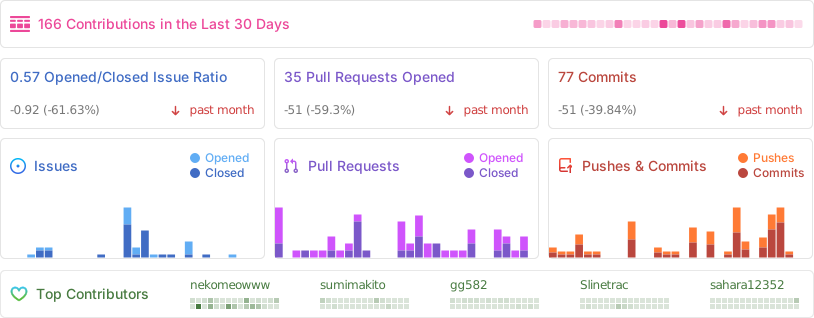
Project Status
Acknowledgements
- Reka UI: for designing the documentation site, the new landing page is based on this, as well as implementing a massive amount of UI components. (shadcn-vue is using Reka UI as the headless, do checkout!)
- pixiv/ChatVRM
- josephrocca/ChatVRM-js: A JS conversion/adaptation of parts of the ChatVRM (TypeScript) code for standalone use in OpenCharacters and elsewhere
- Design of UI and style was inspired by Cookard, UNBEATABLE, and Sensei! I like you so much!, and artworks of Ayame by Mercedes Bazan with Wish by Mercedes Bazan
- mallorbc/whisper_mic
xsai: Implemented a decent amount of packages to interact with LLMs and models, like Vercel AI SDK but way small.
Supporters
<p align="center"> <strong>Thank you for supporting Project AIRI through OpenCollective, Patreon, and Ko-fi.</strong> </p> <p align="center"> <img src="./docs/assets/sponsors/sponsors.svg" alt="Project AIRI supporters" /> </p>Special Thanks
Special thanks to all contributors for their contributions to Project AIRI ❤️
<a href="https://github.com/moeru-ai/airi/graphs/contributors"> <img src="https://contrib.rocks/image?repo=moeru-ai/airi" /> </a>