
English | 简体中文 | 繁體中文 | 日本語 | 한국어
<img src="./docs/images/banner.png" width="320px" alt="PDF2ZH"/> <h2 id="title">PDFMathTranslate</h2> <p> <!-- PyPI --> <a href="https://pypi.org/project/pdf2zh/"> <img src="https://img.shields.io/pypi/v/pdf2zh"></a> <a href="https://pepy.tech/projects/pdf2zh"> <img src="https://static.pepy.tech/badge/pdf2zh"></a> <a href="https://hub.docker.com/r/byaidu/pdf2zh"> <img src="https://img.shields.io/docker/pulls/byaidu/pdf2zh"></a> <a href="https://hellogithub.com/repository/8ec2cfd3ef744762bf531232fa32bc47" target="_blank"><img src="https://api.hellogithub.com/v1/widgets/recommend.svg?rid=8ec2cfd3ef744762bf531232fa32bc47&claim_uid=JQ0yfeBNjaTuqDU&theme=small" alt="Featured|HelloGitHub" /></a> <a href="https://gitcode.com/Byaidu/PDFMathTranslate/overview"> <img src="https://gitcode.com/Byaidu/PDFMathTranslate/star/badge.svg"></a> <a href="https://huggingface.co/spaces/reycn/PDFMathTranslate-Docker"> <img src="https://img.shields.io/badge/%F0%9F%A4%97-Online%20Demo-FF9E0D"></a> <a href="https://www.modelscope.cn/studios/AI-ModelScope/PDFMathTranslate"> <img src="https://img.shields.io/badge/ModelScope-Demo-blue"></a> <a href="https://github.com/Byaidu/PDFMathTranslate/pulls"> <img src="https://img.shields.io/badge/contributions-welcome-green"></a> <a href="https://t.me/+Z9_SgnxmsmA5NzBl"> <img src="https://img.shields.io/badge/Telegram-2CA5E0?style=flat-squeare&logo=telegram&logoColor=white"></a> <!-- License --> <a href="./LICENSE"> <img src="https://img.shields.io/github/license/Byaidu/PDFMathTranslate"></a> </p><a href="https://trendshift.io/repositories/19816" target="_blank"><img src="https://trendshift.io/api/badge/repositories/19816" alt="PDFMathTranslate%2FPDFMathTranslate | Trendshift" style="width: 250px; height: 55px;" width="250" height="55"/></a>
</div> <h2 id="updates">1. What does this do?</h2>Scientific PDF document translation preserving layouts.
- 📊 Preserve formulas, charts, table of contents, and annotations.
- 🌐 Support multiple languages, and diverse translation services.
- 🤖 Provides commandline tool, interactive user interface, and Docker
-
[October 3, 2026] Translated PDFs automatically add spaces between adjacent CJK and Latin letters, including accented letters, in normal and
--ultrafastmodes. -
[October 2, 2026] Added the
--ultrafastCLI mode for native-text PDFs. It usespdf-inspectortext positions for heuristic layout and skips ONNX layout and OCR. (by @reycn) -
[September 8, 2026] Experimental OCR support, with paragraph regrouping and adaptive typesetting. (by @reycn)
-
[March 23, 2026] Experimental support for v2.0 translation kernel using isolated environment (
--mode precise). (by @reycn) -
[March 22, 2026] Supporting MiniMax (PR by @octo-patch)
-
[March 22, 2026] Fixing OpenAI-related issues (PR by @samqin123)
-
[March 22, 2026] Fixing HTTP-related issues (PR by @soukouki)
-
[March 22, 2026] Faster model loading on mac and OONX platforms, GUI starting-up, version printing, and continuous integration.(by @reycn)
-
[May 9, 2025] pdf2zh 2.0 Preview Version #586: The Windows ZIP file and Docker image are now available.
[!NOTE]
2.0 Moved to a new repository under the organization: PDFMathTranslate/PDFMathTranslate-next
Version 2.0 official release has been published.
You can try our application out using either of the following demos:
- Public free service online without installation (recommended).
- Immersive Translate - BabelDOC Free usage quota is available; please refer to the FAQ section on the page for details. (recommended)
- Demo hosted on HuggingFace
- Demo hosted on ModelScope without installation.
Note that the computing resources of the demo are limited, so please avoid abusing them.
<h3 id="install">3.2 Local Installation</h3>For different use cases, we provide distinct methods to use our program:
<details open> <summary>3.2.1 Python: Install using uv</summary>-
Python installed (3.11 <= version <= 3.12)
-
Install our package:
pip install uv uv tool install --python 3.12 pdf2zh -
Execute translation, files generated in current working directory:
pdf2zh document.pdf
-
Python installed (3.11 <= version <= 3.12)
-
Install our package:
pip install pdf2zh -
Execute translation, files generated in current working directory:
pdf2zh document.pdf
-
Python installed (3.11 <= version <= 3.12)
-
Install our package:
pip install pdf2zh
-
Start using in browser:
pdf2zh -i -
If your browser has not been started automatically, goto
<img src="./docs/images/gui.gif" width="500"/>http://localhost:7860/
See documentation for GUI for more details.
</details> <details> <summary>3.2.4 Application: On Windows</summary>-
Download pdf2zh-version-win64.zip from release page
-
Unzip and double-click
pdf2zh.exeto run.
</details> <details> <summary>3.2.5 Reference manager: Zotero Plugin</summary>[!TIP]
- If you're using Windows and cannot open the file after downloading, please install vc_redist.x64.exe and try again.
See Zotero PDF2zh for more details.
</details> <details> <summary>3.2.6 Docker: Containerized Deployment</summary>-
Pull and run:
docker pull byaidu/pdf2zh docker run -d -p 7860:7860 byaidu/pdf2zh -
Open in browser:
http://localhost:7860/
For docker deployment on cloud service:
<div> <a href="https://www.heroku.com/deploy?template=https://github.com/Byaidu/PDFMathTranslate"> <img src="https://www.herokucdn.com/deploy/button.svg" alt="Deploy" height="26"></a> <a href="https://render.com/deploy"> <img src="https://render.com/images/deploy-to-render-button.svg" alt="Deploy to Koyeb" height="26"></a> <a href="https://zeabur.com/templates/5FQIGX?referralCode=reycn"> <img src="https://zeabur.com/button.svg" alt="Deploy on Zeabur" height="26"></a> <a href="https://template.sealos.io/deploy?templateName=pdf2zh"> <img src="https://sealos.io/Deploy-on-Sealos.svg" alt="Deploy on Sealos" height="26"></a> <a href="https://app.koyeb.com/deploy?type=git&builder=buildpack&repository=github.com/Byaidu/PDFMathTranslate&branch=main&name=pdf-math-translate"> <img src="https://www.koyeb.com/static/images/deploy/button.svg" alt="Deploy to Koyeb" height="26"></a> </div></details> <details> <summary>3.2.* Solutions for network issues in installation</summary>[!TIP]
- If you cannot access Docker Hub, please try the image on GitHub Container Registry.
docker pull ghcr.io/byaidu/pdfmathtranslate
docker run -d -p 7860:7860 ghcr.io/byaidu/pdfmathtranslate
Users in specific regions may encounter network difficulties when loading the AI model. The current program relies on the AI model (wybxc/DocLayout-YOLO-DocStructBench-onnx), and some users are unable to download it due to these network issues.
To address issues with downloading this model, use the following environment variable as a workaround:
set HF_ENDPOINT=https://hf-mirror.com
For PowerShell user:
$env:HF_ENDPOINT = https://hf-mirror.com
If the solution does not work to you / you encountered other issues, please refer to Frequently Asked Questions.
</details> <h2 id="usage">4. Technical Details</h2>Experimental automatic OCR (fast mode)
Fast mode automatically runs local OCR on selected image-only pages before
translation. Native text, existing OCR layers, and blank pages are skipped;
the original pages in dual output remain unchanged. Install with
pip install 'pdf2zh[ocr]' (or pip install -e '.[ocr]' from this checkout).
The first scanned page downloads the requested language data from Tesseract's
tessdata_fast 4.1.0 release into ~/.cache/pdf2zh/tessdata/4.1.0; subsequent
runs reuse it offline. Native-text PDFs do not trigger downloads.
OCR uses the input language; PDF2ZH_OCR_LANGUAGE=eng+deu overrides it with
Tesseract language codes. Set TESSDATA_PREFIX to use your own data without
automatic downloads.
PyMuPDF supplies the OCR engine; the optional extra adds Pooch for cached downloads. No separate Tesseract executable is required. OCR words are regrouped into paragraphs within detected layout regions before translation, with wrapped lines and soft hyphens joined. Translated paragraphs start at the median source font size and shrink to fit their original boxes; detected figures, tables, and standalone formulas remain untouched. The initial implementation targets white-background scans: partial scans on pages that already contain text are skipped, and handwritten text or inline equations may be recognized incorrectly. Precise mode is unchanged.
Ultrafast mode
Install the optional pdf-inspector>=1.25.2,<2 dependency with
pip install 'pdf2zh[ultrafast]', then run:
pdf2zh example.pdf --ultrafast
--ultrafast uses native PDF text positions from pdf-inspector for heuristic
layout. It skips ONNX layout and OCR; pages without native text are preserved
without OCR. Its heuristic text grouping retains the usual font and character
formula safeguards. It is best suited to PDFs that already contain native text;
use normal mode for complex tables or formulas. It is available only in fast
CLI mode and cannot be combined with --mode precise, --babeldoc, server or
GUI modes, or --onnx. It automatically skips font subsetting, so its output
PDFs are larger, while still using BabelDOC font assets as needed. With
--ignore-cache, it bypasses both translation-cache reads and writes; normal
mode keeps its existing --ignore-cache behavior. Ultrafast uses a shared
whole-document paragraph worker pool with 16 workers by default and submits
individual paragraph requests; -t overrides this value, while normal mode
keeps its default of 4. [ultrafast perf] INFO logs report stage and per-page
timings. page_scan is the paragraph-submission scan; translation is the
elapsed wait for the whole-document pool to drain, including API retries, so
it is not a sum of per-page waits. paragraph_parse covers both passes,
typesetting runs after translation completes, and layout_extract is
reported separately before font setup. page_processing includes nested
layout_mask, paragraph_parse, translation, and typesetting timings, so
do not sum the nested values again. This path does not import ONNX or OpenCV.
4.1 Advanced options
Execute the translation command in the command line to generate the translated document example-mono.pdf and the bilingual document example-dual.pdf in the current working directory. Use Google as the default translation service. More support translation services can find HERE.
In the following table, we list all advanced options for reference:
| Option | Function | Example |
|---|---|---|
| files | Local files | pdf2zh ~/local.pdf |
| links | Online files | pdf2zh http://arxiv.org/paper.pdf |
-i | Enter GUI | pdf2zh -i |
-p | Partial document translation | pdf2zh example.pdf -p 1 |
-li | Source language | pdf2zh example.pdf -li en |
-lo | Target language | pdf2zh example.pdf -lo zh |
-s | Translation service | pdf2zh example.pdf -s deepl |
-t | Multi-threads | pdf2zh example.pdf -t 1 |
-o | Output dir | pdf2zh example.pdf -o output |
-f, -c | Exceptions | pdf2zh example.pdf -f "(MS.*)" |
-cp | Compatibility Mode | pdf2zh example.pdf --compatible |
--ultrafast | Use native PDF text positions for heuristic layout; skip ONNX layout and OCR | pdf2zh example.pdf --ultrafast |
--skip-subset-fonts | Skip font subset | pdf2zh example.pdf --skip-subset-fonts |
--ignore-cache | Ignore translate cache | pdf2zh example.pdf --ignore-cache |
--share | Public link | pdf2zh -i --share |
--authorized | Authorization | pdf2zh -i --authorized users.txt [auth.html] |
--prompt | Custom Prompt | pdf2zh --prompt [prompt.txt] |
--onnx | [Use Custom DocLayout-YOLO ONNX model] | pdf2zh --onnx [onnx/model/path] |
--serverport | [Use Custom WebUI port] | pdf2zh --serverport 7860 |
--dir | [batch translate] | pdf2zh --dir /path/to/translate/ |
--config | configuration file | pdf2zh --config /path/to/config/config.json |
--serverport | [custom gradio server port] | pdf2zh --serverport 7860 |
--mode | Translation mode: fast (default, v1) or precise (v2, experimental, requires pdf2zh_next submodule) | pdf2zh --mode precise example.pdf |
--babeldoc | Use Experimental backend BabelDOC to translate | pdf2zh --babeldoc -s openai example.pdf |
--mcp | Enable MCP STDIO mode | pdf2zh --mcp |
--sse | Enable MCP SSE mode | pdf2zh --mcp --sse |
For detailed explanations, please refer to our document about Advanced Usage for a full list of each option.
<h3 id="downstream">4.2 Downstream Development</h3> For downstream applications, please refer to our document about [API Details](./docs/APIS.md) for further information about:- Python API, how to use the program in other Python programs
- HTTP API, how to communicate with a server with the program installed
-
Byaidu/PDFMathTranslate: The present and the original project for stable release.
-
PDFMathTranslate/PDFMathTranslate-next: A fork with web-ui and additional features. This fork handles a large number of marginal cases, improves PDF compatibility, and optimizes cross-column and cross-page semantic consistency, dynamic scaling, and dynamic scaling consistency, among many other translation quality improvements. However, this fork is intended solely for development and does not address compatibility issues and is not designed for community-contributions.
This work has been accepted by the Proceedings of the 2025 Conference on Empirical Methods in Natural Language Processing: System Demonstrations (EMNLP 2025).
Citation:
@inproceedings{ouyang-etal-2025-pdfmathtranslate,
	    title = "{PDFM}ath{T}ranslate: Scientific Document Translation Preserving Layouts",
	    author = "Ouyang, Rongxin  and
	      Chu, Chang  and
	      Xin, Zhikuang  and
	      Ma, Xiangyao",
	    editor = {Habernal, Ivan  and
	      Schulam, Peter  and
	      Tiedemann, J{\"o}rg},
	    booktitle = "Proceedings of the 2025 Conference on Empirical Methods in Natural Language Processing: System Demonstrations",
	    month = nov,
	    year = "2025",
	    address = "Suzhou, China",
	    publisher = "Association for Computational Linguistics",
	    url = "https://aclanthology.org/2025.emnlp-demos.71/",
	    pages = "918--924",
	    ISBN = "979-8-89176-334-0",
	    abstract = "Language barriers in scientific documents hinder the diffusion and development of science and technologies. However, prior efforts in translating such documents largely overlooked the information in layouts. To bridge the gap, we introduce PDFMathTranslate, the world{'}s first open-source software for translating scientific documents while preserving layouts. Leveraging the most recent advances in large language models and precise layout detection, we contribute to the community with key improvements in precision, flexibility, and efficiency. The work is open-sourced at https://github.com/byaidu/pdfmathtranslate with more than 222k downloads."
	}
-
Immersive Translation sponsors monthly Pro membership redemption codes for active contributors to this project, see details at: CONTRIBUTOR_REWARD.md
-
New backend: BabelDOC
-
Document merging: PyMuPDF
-
Document parsing: Pdfminer.six
-
Document extraction: MinerU
-
Document Preview: Gradio PDF
-
Multi-threaded translation: MathTranslate
-
Layout parsing: DocLayout-YOLO
-
Document standard: PDF Explained, PDF Cheat Sheets
-
Multilingual Font: Go Noto Universal
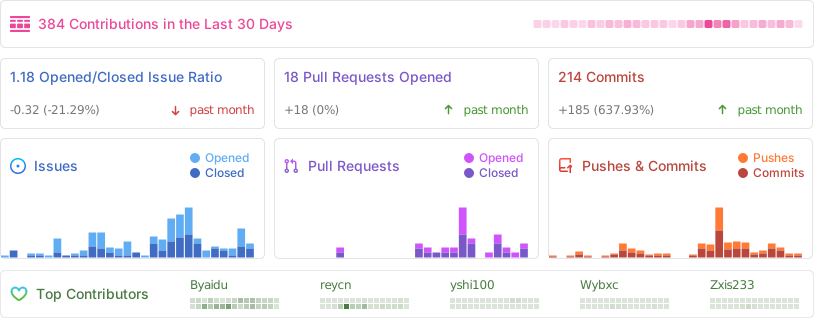
For details on how to contribute, please consult the Contribution Guide.
<h3 id="star_hist">5.4 Star History</h3> <!-- star-history:start --> <picture> <source media="(prefers-color-scheme: dark)" srcset="assets/star-history/star-history-dark.svg"> <img alt="Star history" src="assets/star-history/star-history-light.svg"> </picture> <!-- star-history:end -->